
If you want to use the account features, the 888Ace Game Register process is the first step. New users can create an account and then use their registered details to log in, while existing members can go directly to the login section. This guide explains the registration process, account verification, login steps, password recovery, and basic account-security practices.
What You Need Before Creating an Account?
Before opening the registration form, have the information you intend to use ready.
Depending on the current version of the platform, registration may ask for details such as:
- Mobile number
- Password
- Verification or OTP code
- Referral code, if applicable
- Other basic account information
Use your own active mobile number. It should be accessible because a verification code may be required during account creation.
You should also create a password that is difficult for other people to guess.
How to Register a New 888Ace Game Account?
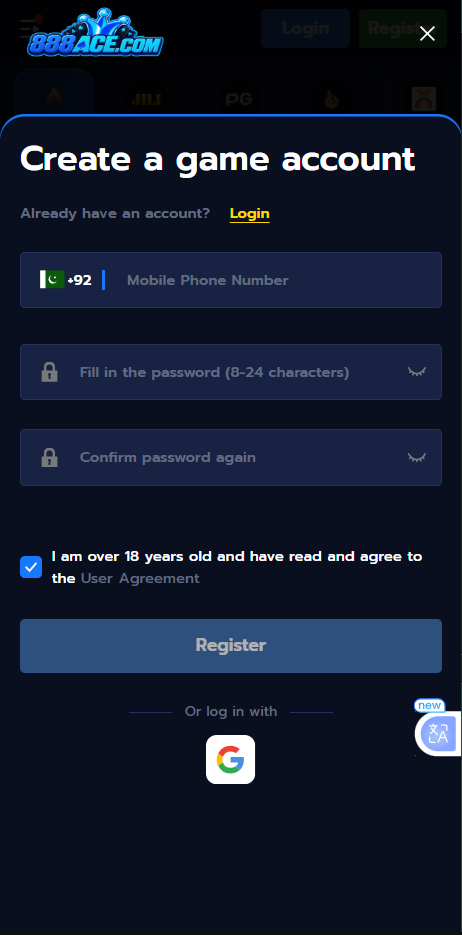
Creating a new account can normally be completed from the Register or Sign Up option.
Follow these steps:
- Open the 888Ace Game App or supported website.
- Select Register or Sign Up.
- Enter the requested mobile number or account details.
- Create a strong password.
- Enter a referral code if you have a valid one and the form provides the option.
- Complete the requested verification step.
- Review the information you entered.
- Submit the registration form.
- Return to the login screen and use your new account details.
The exact fields and button names may change when the platform is updated, so follow the instructions displayed in the current version rather than relying on an old screenshot or guide.
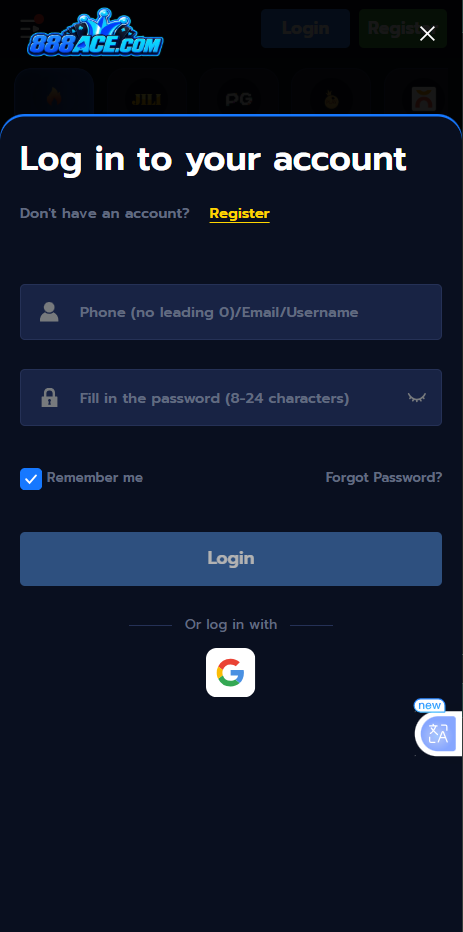
Mobile Number and OTP Verification
If the registration form uses mobile verification, an OTP may be sent to the number you entered.
Enter the code only in the verification field provided by the platform.
Never give an OTP to another person. Someone asking for your verification code does not need it to help you with a normal registration or login problem.
If the code does not arrive, check that:
- The mobile number is correct.
- Your phone has network coverage.
- SMS messages are working.
- You have not requested multiple codes in a short period.
- The previous code has not expired.
If necessary, wait briefly and request another verification code through the available option.
How to Choose a Strong Account Password?
Your password protects both your account and any account information connected with it.
Avoid using:
- Your name
- Date of birth
- Mobile number
- 123456
- Simple repeated characters
- A password you already use on another website
A longer password containing a mixture of letters, numbers, and symbols is generally harder to guess.
Do not save your password in a public computer or send it to another person through social media or messaging apps.
How to Log In to 888Ace Game App?
Once your account has been created, you can use the Login option to access it.
The normal process is:
- Open the installed application or supported web page.
- Select Login.
- Enter your registered mobile number, username, or other requested login information.
- Enter your password.
- Complete any verification requested on screen.
- Tap Login or the equivalent button.
- Wait for your account dashboard to load.
After successful login, you can access the sections available to your account, such as games, profile information, rewards, and wallet features.
Register vs Login: Which Option Should You Choose?
The two buttons have different purposes.
| Option | When to Use It |
| Register | You do not have an account yet |
| Login | You already have an account |
| Forgot Password | You cannot remember your existing password |
| OTP Verification | The platform asks you to confirm your mobile number or identity |
If you already registered an account, do not create another account simply because you cannot remember the login details. Use the available account-recovery option first.
How to Recover a Forgotten Password?
If you cannot remember your password, look for the Forgot Password, Reset Password, or similar option on the login screen.
The recovery process may ask you to verify the mobile number connected to your account.
A typical process is:
- Open the login screen.
- Select the password recovery option.
- Enter the requested account or mobile information.
- Complete OTP verification if requested.
- Create a new password.
- Confirm the new password.
- Return to the login page.
- Sign in using the updated credentials.
Do not use a password-reset link or verification code supplied by an unknown person.
What If Your Login Details Are Not Working?
Incorrect login information is one of the most common reasons for access problems.
First, check whether:
- You entered the correct mobile number or username.
- Caps Lock or keyboard settings changed your password.
- There is an accidental space in the username or password.
- You recently changed your password.
- Your internet connection is working.
If you still cannot sign in, use the official recovery or support option instead of repeatedly guessing the password.
What If Your OTP Is Not Arriving?
If the verification message is delayed, avoid repeatedly requesting codes.
Start by checking the mobile number displayed on the screen. Then make sure your phone has a working network connection and can receive normal SMS messages.
If the problem continues, use the support channel provided by the platform.
Never pay another person to “activate” an OTP or send them the code received on your phone.
Can You Register More Than One Account?
Do not assume that multiple accounts are permitted.
Some gaming platforms restrict users to one account, while specific promotional or referral programs can have their own eligibility requirements.
Before creating another account, check the current account rules. Multiple accounts created to obtain promotional benefits can potentially result in restrictions if the platform prohibits that activity.
How to Keep Your 888 Ace Account Secure?
Account security should start from the first login.
Keep Your Password Private
Your password should remain known only to you. Customer support should not need your complete password.
Never Share OTP Codes
An OTP is designed to verify access to your account. Treat it as private information.
Use Your Own Mobile Number
Using a number that you control makes account recovery easier if verification is required later.
Avoid Unknown Login Links
Do not enter your username, password, or OTP into a page sent through an unknown social media account or messaging contact.
Log Out on Shared Devices
If you use another person’s phone or a public computer, log out after finishing your session and avoid saving your credentials in the browser.
Registration Problems and Their Solutions
Registration Button Is Not Working
Refresh the page or restart the application and try again. Check your internet connection if the registration form does not load properly.
Mobile Number Is Rejected
Check that the number is entered in the format requested by the registration form. If the number is already linked to an account, use the login or password-recovery option instead.
OTP Has Expired
Request a new verification code and enter the newest code rather than an older one.
Registration Says the Account Already Exists
This generally means the supplied information may already be connected with an account. Try logging in or recovering the existing account instead of registering repeatedly.
Login Keeps Failing
Recheck your credentials and use the password-recovery option if necessary. If the issue is caused by the application rather than your account, check for an available update.
Register and Login on Android
Android users who have installed the APK can normally open the application from their phone and access the account section from there.
If you have not installed the application yet, visit the Download & Install page first. Make sure you are using the intended APK before entering your account information.
Keeping the application updated can also help when an older version develops compatibility or login problems.
Is Registration Required to Use the Platform?
Account requirements depend on the feature you want to use.
Browsing information may not require an account, but features involving a personal profile, wallet, rewards, deposits, withdrawals, or account history generally require users to sign in.
Check the current version for the exact access requirements before providing personal or payment information.
What to Do After Registering?
Once registration is complete, do not rush directly into making a deposit.
First:
- Log in successfully.
- Check your profile information.
- Review the available account sections.
- Read the applicable terms.
- Understand how deposits and withdrawals work.
- Review any bonus conditions before accepting promotional offers.
- Set a personal spending limit if you intend to use real-money gaming features.
Understanding the account first makes it easier to identify where your information, balance, and transaction history are located.
Final Thoughts
The 888Ace Game Register process is primarily about creating a secure account that you can access later through the login section. Use your own mobile number, create a strong password, protect every OTP, and use the platform’s built-in recovery process if you lose access.
Registration should not require you to share your password or verification code with another person. If something about the account setup looks unusual, stop before entering sensitive information and verify the source first.
Important: Account fields, verification requirements, login methods, and available features may change with future versions. Follow the instructions displayed in the current 888Ace Game application or website. Real-money gaming can involve financial risk, so use the service responsibly and check the laws applicable to you.
888Ace Game Register & Login - New Earning App 2026

888Ace Game Register and Login guide for new and existing users. Learn how to create an account, verify your details, sign in and recover access safely.
Price: Free
Price Currency: PKR
Operating System: Android 5.0+
Application Category: Casino Game
4.9